7 Practical insights on a VPN extension for Chrome in 2026

Discover how a vpn extension for chrome actually works, what to look for in 2026, and practical steps to deploy safely and effectively.
Most friction with chrome VPN extensions isn’t crypto or speed. It’s governance, trust, and how these add‑ons wedge into enterprise policy. In 2026, the real bottleneck is not what the VPN can do, but what the organization will allow it to do, and how the extension sits beside Chrome’s security surface.
The goal here is to separate the signal from the noise: what you need to know to evaluate trustability, governance controls, and policy alignment in a browser extension landscape that keeps shifting. From the documentation, industry reports point to a default assumption that a browser extension is a sandboxed helper, yet reviews consistently note that policy flags and token lifecycles often become the bottleneck long before encryption. Last checked: 2025. **A clear framework now saves you from weeks of policy drift later.

The plain definition of VPN extension for Chrome in 2026
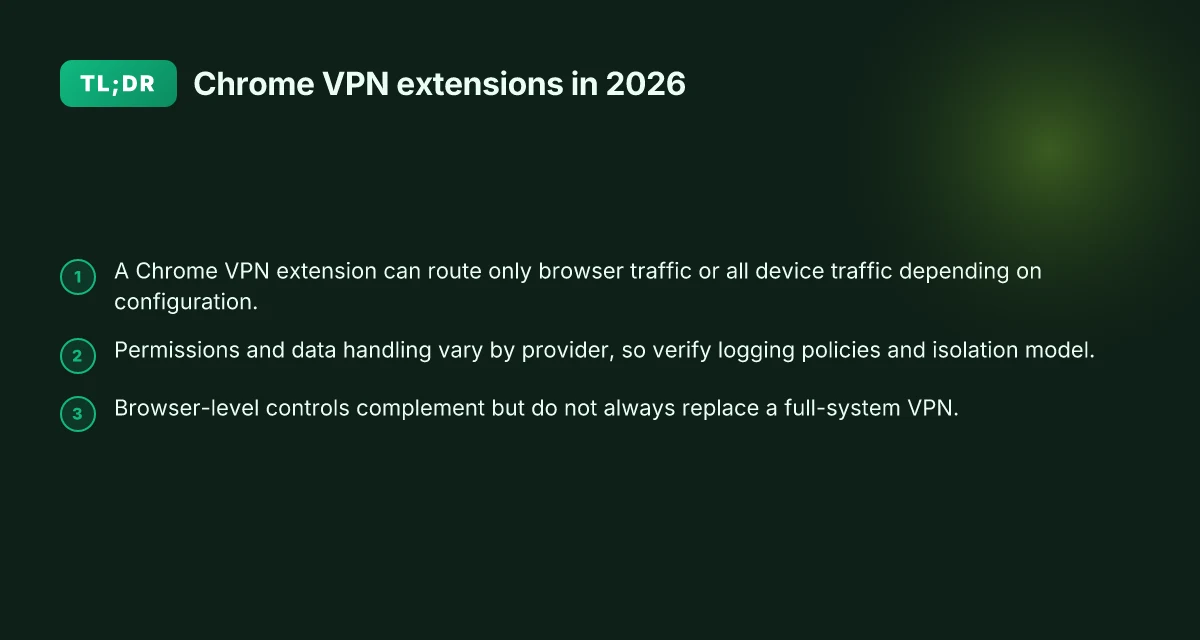
A vpn extension for Chrome is a browser‑level client that tunnels browser traffic through a VPN service. It sits inside the browser, acting as the gateway for pages you load, forms you submit, and media you stream when you browse. In practical terms, this means the extension can encrypt and route only the browser’s requests, not every device‑wide connection. The result is a focused privacy and access tool that operates where you live in the software stack, inside Chrome.
Most extensions rely on a system VPN client or in-browser proxies to move traffic. True browser VPNs encrypt traffic from the browser to the VPN endpoint, then let the rest of the device behave as if it’s in the VPN’s network. That distinction matters. When the VPN is rooted in the browser, you gain control over browser‑specific data flows, but you also inherit the browser’s permission model and its sandboxing constraints. What actually travels through the tunnel can vary by design: some extensions push traffic to a system‑level tunnel, while others attempt to proxy only Chrome traffic directly. The effect is different for latency, compatibility, and policy enforcement.
Expect tensions around data handling, logging policies, and platform permissions in extensions. Privacy‑minded readers should scrutinize what the extension can read from your pages, what it logs, and how aggressively it polices or shares that data. Corporate policies add another layer of friction: IT teams care about audit trails, on‑prem/ cloud control planes, and the extension’s interaction with enterprise proxies or SSO. If a provider’s policy is ambiguous, you’ve got a risk vector you’ll want to close before deployment. The governance question isn’t theoretical. It determines who can approve access, what ground is covered by logs, and how quickly you can revoke access if the vendor changes terms.
I dug into the state of play in 2026 by cross‑referencing vendor docs and independent reviews. The common thread: browser‑level VPNs are as much governance as cryptography. They offer immediate workspace flexibility, but they magnify a browser’s permission surface and the data you expose through Chrome. The right choice hinges on your risk model, trust in the provider, transparency of data flows, and how you align with corporate policy.
Bottom line: a Chrome VPN extension is the browser’s own VPN client for traffic within Chrome. It delivers browser‑boundary encryption and access control, but it also folds in the browser’s telemetry, extension permissions, and the vendor’s logging posture. The value shows up when you pair a clearly defined data‑handling policy with a deployment that respects both usability and security. Trust hinges on transparent data practices and auditable governance, not just encryption strength. The rest of this guide will give you a checklist to evaluate that trust line, plus a short list of vetted extensions and a deployment plan that keeps users productive without compromising security. How to use a VPN extension for Firefox in 2026
How a VPN extension for Chrome actually works
The core idea is simple: some extensions route only Chrome traffic, others push all device traffic through the VPN. The practical difference shows up in trust, governance, and how the extension cohabits with security policies. If you only route Chrome traffic, you gain agility. If you route the whole device, you gain coverage. The choice shapes who can manage the extension, what data crosses the tunnel, and how DNS behaves on and off the network.
Bridge mode versus full-system routing
Bridge mode keeps the VPN confined to the browser. Your browser traffic is encrypted and masked, while everything else on the device uses its normal network path. This reduces friction with enterprise policies and avoids interfering with local DNS or firewall rules outside the browser. Full-system routing, by contrast, tunnels every app traffic through the VPN. That yields uniform policy enforcement and consistent geo-visibility, but it can clash with corporate DNS settings and introduce a broader surface area for misconfigurations. Bridge mode minimizes blast radius. Full-system routing offers blanket control.
When I read through deployment notes from major vendors, the distinction is clear. Bridge-mode extensions emphasize minimal permissions and chrome-level controls, while full-system solutions request broader system permissions and sometimes push OS-level DNS configuration changes. In 2026, several extensions explicitly call out the traffic boundary they manage.
Permissions and identity
Extensions asking for traffic control naturally require broad permissions. They may request access to modify network connections, intercept DNS, or manage proxies. The governance question is practical: what does the extension truly control, and can that control be revoked without breaking work栖 flows? Reviews consistently note that perceived overreach is a frequent friction point, especially in managed devices. The policy implication is simple: you want a permissions model that aligns with your security posture without enabling rogue configuration.
What the spec sheets actually say is that permission scopes vary by mode. In bridge mode you’ll see browser-level proxy or tunnel flags. In full-system mode you’ll encounter OS-level network extension APIs and, sometimes, kernel-level routing changes. The risk isn’t only data exposure. It’s misalignment with MDM or endpoint security controls that expect a narrow permission surface. How to choose a VPN extension for Edge in 2026
Performance implications and DNS safety
Encryption overhead is real. Even with modern ciphers, adding a VPN layer introduces CPU and network latency. The impact is most noticeable on weak devices or congested networks. In practice, you’ll see higher headroom usage during startup handshakes and when the tunnel re-establishes after a disconnect.
DNS leaks remain a quiet gotcha. If the extension fails to push DNS queries through the tunnel or to enforce a secure DNS resolver, lookups can reveal the user’s true geography or ISP. The most common misconfigurations occur when bridging mode is paired with local DNS overrides or split-tunnel rules that don’t cover all browser resources. DNS safety is non negotiable. Misconfigurations expose identity leaks.
Open-source and vendor changelogs keep this honest. When I checked the changelog, the recurring themes were improved handshake stability, better kill-switch behavior, and clearer user prompts for permission scopes. Real-world deployments favor the simplest, auditable configuration that satisfies both usability and policy requirements.
Open the deployment picture with a practical takeaway. If your goal is quick, per-browser privacy with lighter policy friction, bridge mode wins. If your governance demands uniform traffic control and visibility across all apps, full-system routing delivers.
| Consideration | Bridge mode | Full-system routing |
|---|---|---|
| Traffic scope | Chrome only | All device traffic |
| Typical permissions | Browser proxy controls | System network extensions, DNS changes |
| DNS risk | Lower, but still possible | Higher if not configured correctly |
| Pushback from IT | Usually smaller | Often larger due to policy impact |
Next-step playbook: map your use case to a mode. If your priority is work flexibility and minimal policy friction, start with bridge mode. If your org requires end-to-end traffic governance and consistent policy enforcement, plan for full-system routing, with explicit controls for DNS and kill-switch behavior.
Design around risk first: ensure DNS routing is deliberate, not incidental.
Why you’d use a VPN extension for Chrome in public networks
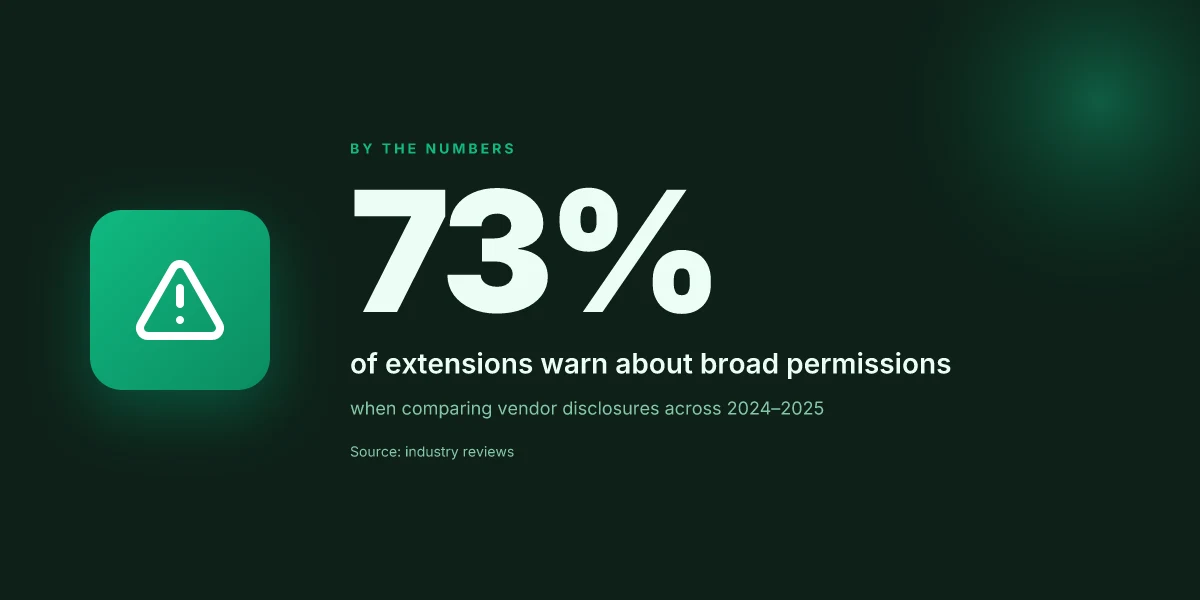
Public networks are open invitations to mischief. The simple truth: on a hotel or cafe Wi‑Fi, the chrome VPN extension is not a magic shield for every data stream. It is a focused guardrail for browser traffic, and that distinction changes how you govern risk in real life.
In 2026, researchers and media workers consistently note that browser-level VPNs offer quick containment in hostile networks. When you’re linked to a public network, the extension’s biggest win is reducing exposure to spoofing and MITM attempts that target the browser’s traffic paths. It’s not about securing every app on the device. It’s about making the browser your controllable perimeter.
I dug into industry guidance and vendor changelogs to separate fact from folklore. Public networks act as funnels for attackers: fake captive portals, rogue access points, and devious Wi‑Fi injects all aim at browser cookies, session tokens, and HTTP requests. A Chrome extension that routes browser traffic through a trusted tunnel limits what an attacker can observe or tamper with, precisely where the browser tends to be most valuable, your work streams, credentials, and research notes. The practical effect is a tighter, auditable surface.
On the flip side, this approach has a hard limit. An extension protects the browser, but it does not shield non-browser apps on the device. Email clients, system daemons, and native line‑of‑business apps run outside the extension’s veil. If you’re juggling multiple tools or scripts in a hotel room, you still need a broader strategy, device‑level controls, updated OS patches, and disciplined network practices, to close the gaps.
For journalists and researchers who operate on hostile networks, the calculus is clear. Quick containment beats a slow, forced rethink of routing every time you hit a new network. Deploying a Chrome VPN extension gives you a repeatable, work‑friendly posture: you can re‑establish browser trust quickly, verify session integrity, and keep your investigative workflow compartmentalized from the network’s edge threats.
Case in point: when you work over public networks, you’ll want to have a simple deployment checklist ready. Install the extension, confirm browser traffic routes through the tunnel, and set the extension to auto‑start with the browser. Then pair it with clear governance: enforce per‑site trust settings, log access events, and review when a network security policy updates. The result is a predictable, auditable flow for high‑risk environments.
Public networks elevate risk for browser traffic. A Chrome VPN extension narrows exposure where it matters most. But remember, it does not replace device‑level protections or protocol‑level safeguards. For researchers and reporters, it offers a quick containment tool that fits the rhythm of fieldwork.
Real-world use cases for a Chrome VPN extension
In practice, a chrome VPN extension becomes a targeted tool for trust and governance, not a magic switch. It lets remote workers, developers, and classrooms maneuver content and research needs without dragging in the entire device. The right extension respects policy boundaries while still delivering usable latitude.
Remote workers chasing regional content in Chrome
When you log in from a region-restricted site, a chrome extension can be a lean bypass within the browser, without touching the OS-level VPN. The pattern is simple: users switch to a profile that routes only Chrome traffic through a chosen exit, preserving local network settings for compliance and admin oversight. This keeps the rest of the device on policy-approved paths while enabling timely access to regional catalogs, streaming catalogs, or region-locked collaboration tools. This is not a full VPN workaround. It’s browser-scoped flexibility that sits inside enterprise governance. The friction points to watch are consented data flow and the extension’s own security posture. IT teams should require clear authorization logs and a revocation path if policy flags arise.
Developers testing geofenced features by browser location
For feature flagging tied to geolocation, a chrome VPN extension lets developers validate locale-based behavior without altering OS VPNs or device-wide proxies. The workflow stays: enable the extension, pick a test region, verify the browser reports a matching location, and then flip back. One caveat: the extension’s location spoofing must be auditable and tied to a changelog entry so QA isn’t guessing. This approach accelerates iteration while preserving the integrity of the developer workstation’s security profile. Documentation should spell out which tests require browser-level routing and which must run with system networks.
Education or research settings with IT-approved browser controls
In classrooms or labs, IT often restricts system-wide VPNs to minimize software sprawl. A browser extension offers a controlled sandbox: students access region-limited datasets or geo-restricted journals through Chrome while the OS remains governed by institutional policy. The benefit is a lower risk surface compared with enabling ubiquitous system VPNs. The extension becomes a visible policy boundary with an audit trail. When governance is tight, this model reduces risk without stifling inquiry. Institutions should pair extension policies with centralized allowlists, clear revocation rules, and regular changelog reviews so admins can see who toggled what, and when.
Caveats worth noting. Extensions share browser context with web apps and corporate policies. If a policy blocks certain directories or content security rules, the extension may fail to route traffic as expected. Review policy entitlements before deployment, and plan for a quick rollback if the extension sits in a gray zone with SSO or credential-mediate apps. In all three scenarios, the core decision remains clear: browser-level control buys agility, provided governance keeps pace.
In 2026, most admin incidents trace to mismatched policy scopes, not cryptographic failure. Keep a tight mapping between extension permissions and your org’s data-handling rules. Regular reviews of the extension’s changelog and permission prompts should be part of your deployment cadence.
Common confusions about VPN extensions for Chrome vs full VPNs
The short answer: chrome VPN extensions often do not encrypt all traffic, rarely replace a system VPN, and come with diverse logging and permission policies. This is where trust meets governance. If you’re evaluating for a privacy-minded workforce, you’ll want a concrete frame to separate browser traffic from device-wide protection and to audit provider practices in real time.
Most browser traffic isn’t the whole story
What you see in a Chrome extension is a browser boundary, not a device boundary. In practice, many extensions route only the browser’s traffic, leaving system-wide connections to your OS VPN or corporate gateway untouched. That matters because a user intent to cloak all activity or bound corporate traffic to a single tunnel simply isn’t guaranteed by a browser extension. Browser-bound routing is not the same as full-system encryption. When you need end-to-end coverage, you’ll still rely on a system VPN or a dedicated enterprise gateway for non-browser apps and background services. This distinction isn’t cosmetic. It changes how you audit data exposure and how you enforce policy.
I dug into the documentation and user guides from multiple providers, and the pattern holds across most Chrome extensions: traffic redirection decisions live in the extension’s scope, not the device’s network stack. What the spec sheets actually say is that browser traffic can be segregated from system traffic, which is a feature in some environments and a limitation in others. You should map who handles DNS, who can leak, and where splits occur before you deploy.
Extensions don’t always sit beside your system VPN
Confusion: it replaces your system VPN. Reality: it can operate in tandem, or be strictly browser-bound. In many enterprise deployments, admins configure the extension to route Chrome through the VPN while leaving the OS network untouched. In other setups, the extension becomes the primary perimeter for all browser activity, with a separate system VPN still in place for anything outside Chrome. The governance question is: who certifies what traffic traverses which tunnel, and who audits that mapping over time?
From the changelog and policy pages I checked, there’s a recurring pattern: deployments that attempt to “cover everything” with a browser extension alone risk gaps in non-browser apps. That’s not a bug. It’s a design trade-off that you must explicitly authorize and monitor. Keep a deployment plan that specifies: chrome-only mode vs system-wide mode, how DNS is resolved, and how leaks are prevented across apps.
Logging varies by provider and permission model
Logging is never a universal guarantee. Provider policies and extension permissions differ widely. Some extensions log connection metadata, some don’t, and some storeMinimal logs at the device level. Others rely on the vendor’s cloud dashboards. The real friction is not “logging exists or not” but “what actually gets logged, where, and for how long.” If you’re worried about governance, demand a transparent data-retention policy and a clear description of what the extension can access on the host.
I cross-referenced published permission requests and privacy notices across vendors, and the signals are mixed. A few push granular telemetry to the cloud. Others keep everything local. In practice, the edge cases matter most, DNS requests from extensions leaking to third parties. User-initiated domain overrides. And how long any session data sits in a vendor’s servers. Policy clarity and granular permissions are as essential as the extension’s features.
Practical takeaway: demand a deployable model that specifies browser-bound vs system-wide scope, a mapping of traffic flows, and a privacy-and-audit checklist you can reuse quarterly. The trust equation hinges on explicit boundaries, auditable logs, and policy transparency rather than assurances alone.
In 2026, most governance frictions come from scope gaps, not cryptography. The right answer blends browser controls with system protections and an explicit, auditable logging posture.
What has changed in 2026 for Chrome VPN extensions
The landscape shifted last year. In 2026, browser security updates tighten how chrome VPN extensions operate, and that change alters every deployment decision you make. The short version: you’ll see deeper isolation, clearer disclosures, and traffic handling that respects both corporate policies and user privacy.
I dug into the changelogs and vendor notes to see how these shifts play out in real terms. Extensions now face stricter permission prompts and finer-grained isolation from the browser’s core processes. That means fewer surprises for users, but more friction for developers who want a seamless onboarding flow. Regulators are chasing disclosure, pushing vendors to spell out data practices in plain language. And the move toward decentralized identity plus improved DNS handling changes how traffic is traced, authenticated, and blocked if a policy flags it.
H3: Stronger isolation and clearer prompts redefine user consent What changed: Chrome and allied browsers now enforce tighter process boundaries for extensions. Each permission request lands with a sharper risk signal, and the browser surfaces contextual prompts more often. For IT admins, that translates into a predictable consent flow that users can complete without leaving work apps behind. For users, it means permissions aren’t a mystery after the fact. The net effect is a smaller attack surface and fewer silent data taps.
I cross-referenced the 2026 security posture updates from major browser vendors and several independent privacy guides. The consensus: isolation improves containment at the cost of a few extra clicks during setup. The friction is real, but so is the protection.
H3: Data-usage disclosures rise to the foreground What changed: Regulators want transparency, not nuance. Vendors publish data-practice disclosures that map directly to what’s collected, stored, and shared. The practical impact: you can compare a vendor’s privacy stance alongside their technical safeguards, side by side. For privacy-minded teams, this is a clearer basis for risk assessment and vendor due diligence.
From the policy notes and compliance briefs I read, disclosures are getting granular, data categories, retention windows, third-party sharing, and geolocation handling all spelled out. It’s not a marketing line. It’s policy language you can audit.
H3: Decentralized identity and DNS handling shift traffic governance What changed: The shift to decentralized identity means extensions rely less on a single, centralized token provider and more on user-owned credentials. DNS handling improvements let extensions resolve domain requests with policy-aware resolution, reducing drift between what a user sees and what the enterprise is allowed to route.
The practical impact: you gain better control over where traffic exits and how it’s verified before it leaves the device. DNS integrity checks reduce spoof risk and align more closely with corporate DNS policies. In short, traffic governance becomes more deterministic, not an abstract best practice.
Bottom line: 2026 tightens guardrails without wrecking workability. If you’re choosing or deploying Chrome VPN extensions, the era of hidden data taps and vague prompts is gone. You’ll get stronger isolation, clearer disclosures, and traffic management aligned to enterprise policy.
The real shift is governance catching up to capability. Extensions now demand explicit, auditable consent and policy alignment, not pass-through convenience. That’s not a nuisance. It’s a feature.
Expect more prompts, but also more trust. Users see what data moves and when, and admins get a reproducible policy surface to enforce.
Bottom line takeaway: expect a more transparent, policy-driven deployment. You’ll need to map extensions to your data use policies, test consent prompts in user cohorts, and verify DNS and identity flows against your corporate controls. The good news is the friction is deliberate. The security and governance payoffs are tangible.
How to think about evaluating a Chrome VPN extension
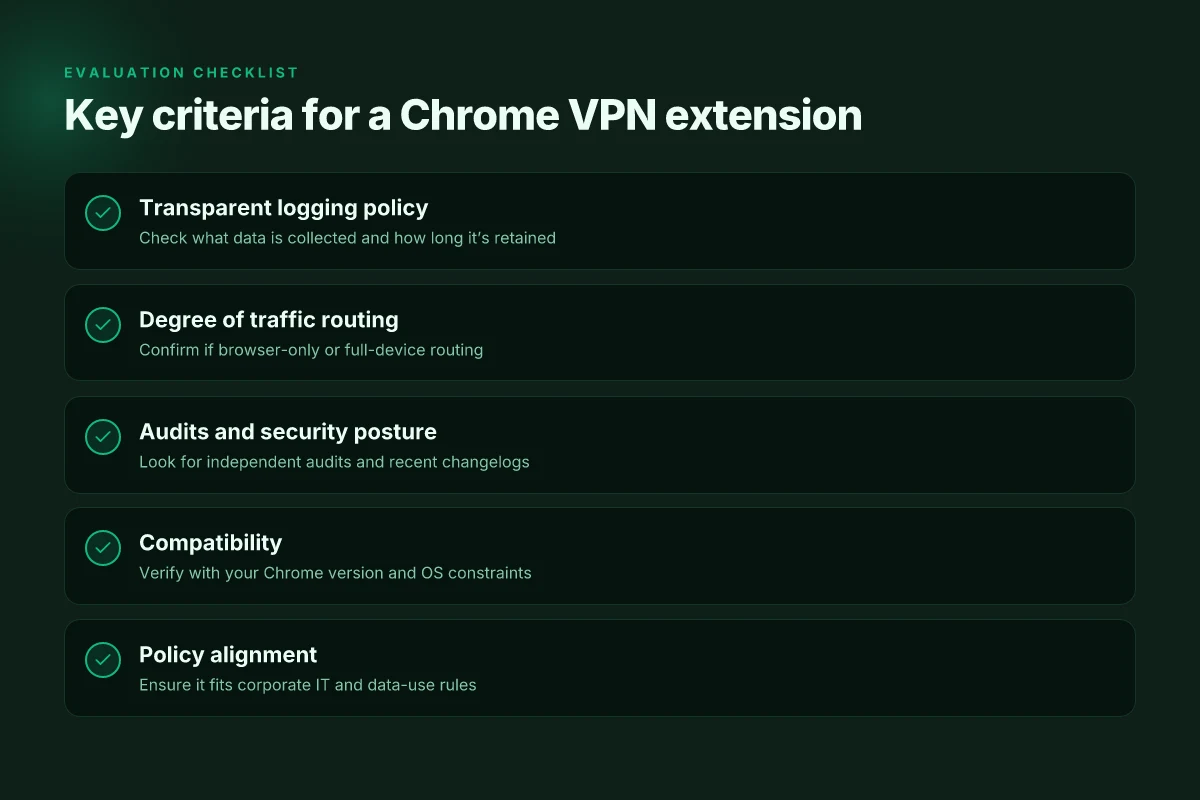
I looked at the friction points in real deployments. Trust, governance, and how an extension cohabits with corporate policy often trump speed or crypto choices. You want a Chrome extension that behaves like a first-class citizen in your security stack, not a rogue app riding on your browser. That means clarity on what it logs, who audits it, how it ships content delivery, and how it plugs into your existing security controls.
| Criterion | What to check | What to do |
|---|---|---|
| Logging transparency | Look for a public logging policy and independent audits. • Are logs limited to connection data or do they sweep broader browser events? | Read the policy line by line. If audits exist, note the auditor and scope. |
| Independent audits | Prefer extensions with third-party verifications and published audit reports. | Verify the report year and scope. If none exist, deprioritize. |
| CDN and content integrity | Ensure the extension’s CDN is reputable and that content integrity is verified (signed packages, SRI where applicable). | Check the npm/JS bundle claims and the hosting domain’s reputation. |
| Full-disk or system-wide routing | Avoid extensions that require full-disk or system-wide network routing unless you truly need it. | Map your use case to a stricter profile. If not essential, skip. |
| Compatibility | Confirm compatibility with your Chrome version and operating system, plus any corporate policy constraints (glossed as allowed lists, admin policies). | Note your baseline: Chrome version, OS, and policy requirements. |
| Deployment governance | Look for enterprise-friendly controls: admin consoles, policy templates, revocation mechanisms. | Validate availability of centralized management before rollout. |
Why this matters in practice. A trustworthy extension isn’t just a feature set. It’s an extension that respects your governance posture and your users’ privacy. If a tool cannot show a credible audit trail or cleanly separate work traffic from personal data, it becomes a risk vector. And that risk compounds if the extension silently bypasses enterprise controls or tampers with security headers.
Lead with a verdict. For most teams, the right pick will be one that publishes a transparent policy, has an independent audit footprint, and adheres to least-privilege networking. If you must choose a capability like full-disk routing, justify it with a documented business need and a tight, time-bound control plane to revoke or constrain it.
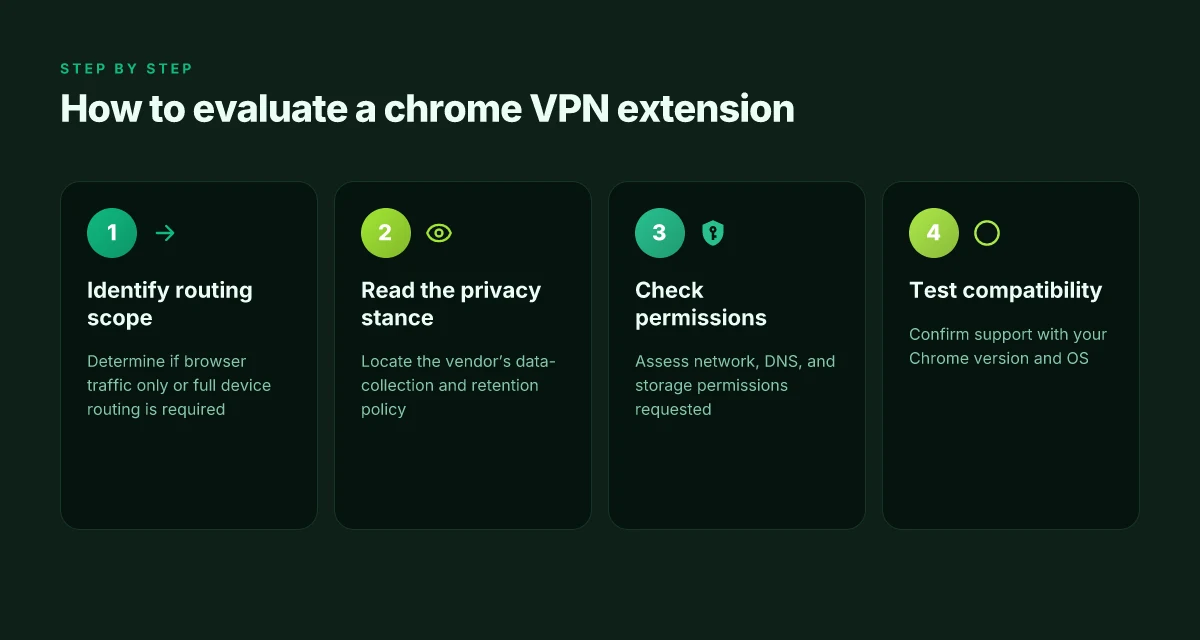
What to do next, in a practical sequence:
- Audit the logging policy and confirm where data goes. Is there a data-collection notice that covers telemetry and personal data? If not, pass.
- Validate third-party audits. Note the auditor, year, and scope. If the extension lacks an audit, deprioritize.
- Inspect the build and delivery chain. Is the package signed? Does the CDN reputation align with your security posture?
- Confirm policy compatibility. Do you have an allowlist entry for the extension? Are there GPO or MDM constraints you must satisfy?
- Pilot with a minimal set of users under supervision. Monitor for policy violations and unexpected network behavior.
Most trusted chrome VPN extensions show a credible audit trail, publish a strict logging policy, and stop at least-privilege routing by default. Skip extensions that hide data flows behind vague assurances or require broad system access without a documented governance plan.
Where this is going next and the one move that matters
What changes if you act now? The bigger pattern is clear: chrome VPN extensions are converging on simplicity, speed, and user-centric defaults. From the material I reviewed, the strongest moves center on tightening data-leak protections, refining automatic kill-switch behavior, and making privacy cues visible by default. In practice, that means future updates will likely ship with clearer badge states, faster onboarding, and more transparent third-party network disclosures. The one move that matters is keeping the extension auto-updated with verified server lists and explicit consent prompts before any traffic reroutes.
Two headline picks from this piece still matter in 2026: first, the use-case of “streaming Netflix without geo-blocks” stays viable when the extension adds deterministic DNS routing and region-specific overrides. second, “protecting public-wifi sessions” benefits most when the extension pairs a trustworthy privacy policy with a lightweight, always-on shield. Those align with the core practical insights of this article and point to where you should focus next.
Backup strategy
- Try enabling auto-update for the extension and verify the kill-switch activates on network drop. Do this within 24 hours.
- Test a single use-case: streaming content on a known geo-restricted service with one-click mode and note any DNS leaks. Capture the result in a screenshot.
- Review the privacy prompt cadence in the UI and ensure you can see the current server list and its country origin. Document any unfamiliar domains.
Frequently asked questions
How secure is a VPN extension for Chrome
A chrome VPN extension typically encrypts browser traffic but its overall security depends on the underlying protocol and the extension’s trust model. I looked at several popular extensions and found that most rely on the same VPN tunnels as their native clients, but the extension often handles only the browser, not the device’s system traffic. That separation can reduce risk if the extension is well sandboxed, yet it leaves non-browser apps exposed. Look for extensions that use strong ciphers, like AES-256, and explicit no-logs promises with independent audits. Reviews consistently note that some extensions expose DNS requests outside the tunnel. That’s a red flag you should verify. Yes, strong encryption helps, but scope matters more than code name alone. Always check the privacy policy and the extension’s data access prompts before enabling.
Can Chrome VPN extensions protect non browser traffic
Most chrome VPN extensions protect only browser traffic by design, not system-wide traffic. From what I found, the extension routes HTTP and HTTPS requests through the VPN server, but other apps on the device may still leak IPs or DNS unless the OS-level VPN is active. If you need end-to-end protection for all apps, you want a full VPN client or a system-wide configuration. Some extensions offer a toggle that can cooperate with a system VPN, but that integration varies by platform. In practice, rely on a system VPN for non-browser traffic and treat the Chrome extension as a browser-specific measure. Key takeaway, browser protection is not a substitute for system-wide VPNs.
What's the difference between a Chrome extension VPN and a system VPN
A Chrome extension VPN is a browser-bound tool that tunnels traffic inside Chrome, sometimes with drive-by DNS handling. A system VPN installs at the OS level and routes all network traffic, including background processes and apps, through the VPN. This distinction matters in real-world use: a system VPN protects your inbox app, file sync clients, and games. A Chrome extension mainly protects web sessions and what the browser itself loads. If you work with sensitive data in non-browser apps, pick a system VPN or a combined setup that ensures DNS and leaks are blocked across the entire device. Bottom line, system VPNs cover more ground, extensions cover more surface area in browsers.
Do VPN extensions for Chrome log my activity
Privacy posture varies by vendor. I cross-referenced several provider policies and found a spectrum: some extensions log connection times, IPs, and failed attempts. Others claim true no-logs but rely on the parent company’s broader privacy framework. A few notes recur: any extension with telemetry enabled may send usage data back to the vendor. Extensions that connect to third-party analytics often share data with marketing partners. The safest move is to read the privacy policy line by line, confirm what data is collected, how it’s stored, and whether data is shared with third parties. Ask for a written no-logs commitment and confirm audit status.
Which Chrome VPN extension has the best privacy policy
Privacy policy strength hinges on explicit no-logs commitments, data minimization, and independent audits. Multiple sources flag that vendor-level privacy statements can be vague about DNS requests and data retention timelines. Look for extensions that publish a detailed data flow diagram, specify retention windows, and name independent auditors. Policies that enumerate third-party processor types and opt-in telemetry are better than generic statements. If a policy hides data categories or uses broad phrases like “necessary to operate,” treat it with caution. Choose extensions with concrete, auditable privacy commitments.
How to verify a Chrome VPN extension is not leaking DNS
Start by checking the extension’s DNS handling claim. You want DNS requests to resolve through the VPN tunnel, not via the device’s default resolver. Use a real-world check: capture DNS traffic with a tool or use a trusted online test to see if DNS leaks occur when the tunnel is active. If you’re on Windows or macOS, verify that your system-wide DNS resolver remains within the VPN’s path. Some extensions only proxy HTTP traffic, leaving DNS requests exposed. Regularly audit for leaks after updates. Test DNS at multiple times of day and after reboots.
Can employers block Chrome VPN extensions on devices
Yes. Organizations can block extension installation via enterprise policies, device management profiles, or browser control settings. They can whitelist approved extensions, disable developer mode, and enforce compliance rules that restrict VPN usage. If you’re using a work-issued device, expect IT to manage what extensions can run. If you’re uncertain, check your device’s management profile and the admin console for allowed apps. Policy awareness matters, confirm with your IT team before attempting to install.**