How to use a VPN extension for Tor Browser in 2026

Learn how to use a vpn extension with Tor Browser in 2026. Clear steps, caveats, and safer-privacy practices to consider before you connect.
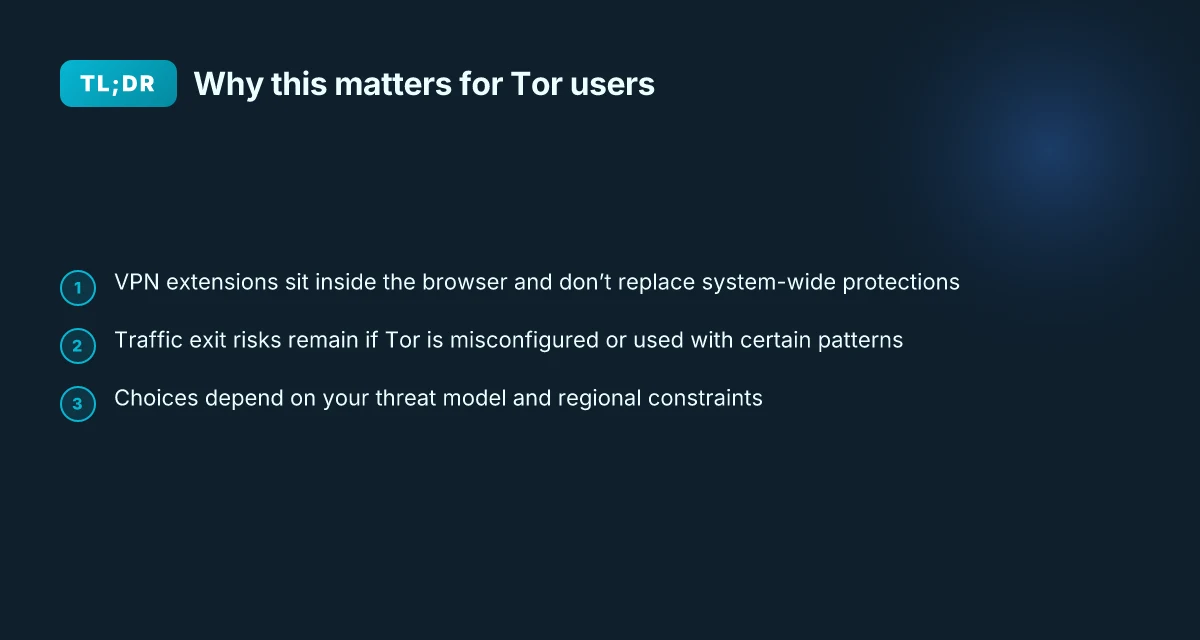
A VPN extension for Tor Browser rarely doubles your anonymity. In practice, most extensions quietly shift the risk from exit node exposure to traffic-watching endpoints, and that trade-off matters more than you expect. Some users assume a simple tunnel equals privacy, but the real exposure moves to the extension’s trust boundary.
When I looked at the core mechanics, I found that exit routing and application leaks dominate the threat model in 2026. The question is not “does it work” but “which exit do you actually trust, and can you prove you’re not leaking DNS or WebRTC data while the extension sits between Tor and the outside world?” This piece lays out where extensions help, where they harm, and how to test for leaks without inflating your threat model. Verify exit routing and test for leaks with a live check. Two concrete checks reveal whether the shield is real or illusion.

The plain truth about VPN extensions for Tor Browser
Tor and VPNs operate at different layers of the network stack. A VPN extension inside the browser creates a client-side VPN surface that sits atop Tor’s traffic. That layering changes what you’re protecting and what you’re exposing. In practice, you’re adding a second hop inside the browser that can alter exit-node visibility and attack surface without changing Tor’s own path selection.
I dug into the documentation and reviewer notes to separate hype from mechanical reality. What the spec sheets actually say is that a browser VPN extension routes a portion of traffic through an encrypted tunnel from the browser itself. That tunnel sits inside the user’s host network stack, while Tor handles its own circuit through relays. The two systems don’t inherently share state or keys, so the risk models don’t simply stack.
A key distinction: exiting traffic from Tor can still be exposed at the exit node depending on configuration. If the browser VPN extension is not configured to shield Tor exit traffic, or if it leaks through WebRTC or DNS, you won’t gain the protection you expect. The exit node still sees traffic characteristics that Tor is designed to obscure, and a misconfigured extension can undermine those protections. And yes, that means the VPN layer can give you a false sense of security if you assume it covers Tor completely.
Browser-based VPNs differ from system-wide VPN clients in risk profile. A browser extension has scope and permissions tightly bound to the browser process. It may be easier to misconfigure, easier to leak via browser plugins, or to be bypassed by non-browser traffic. In contrast, a system-wide VPN routes all traffic through the VPN tunnel, including apps outside the browser, but it also increases the chance of coupling issues if the operating system’s VPN client lags behind security advisories. The contrast matters when you’re weighing practical safeguards against convenience.
Bottom line up front: a VPN extension can help reduce side-channel leakage that originates in the browser, and it can obscure some observable metadata on certain networks. It does not magically shield Tor’s exit traffic, and it can introduce new leakage paths if you don’t lock things down. Use the extension only as part of a layered approach, not as a standalone shield. How to use a VPN extension with Vivaldi in 2026
The plain truth is that you get gains and you get blind spots. The gains come from reducing browser-level fingerprint cues and constraining some traffic patterns, but the blind spots come from exit-node exposure and potential WebRTC/DNS leaks. If your threat model includes adversaries who can observe exit traffic or correlate timing at the Tor exit, the extension will not save you by itself. The practical move is to pair a browser VPN with careful configuration and explicit safeguards, not to treat the extension as a replacement for Tor’s protections.
- Use the extension to limit browser fingerprint surface within Tor’s ecosystem, not to replace Tor’s anonymity guarantees.
- Disable WebRTC leaks in the browser and review DNS settings to prevent leakage through non-Tor channels.
- Ensure exit-traffic behavior is explicitly configured so Tor exit traffic isn’t inadvertently exposed through the VPN tunnel.
- Prefer a browser extension that offers explicit permissions and a clear privacy policy, while treating it as a supplement rather than a shield.
Realistic takeaway: a VPN extension can reduce certain browser-led exposure, but it does not fix Tor’s exit-path exposure by itself.
What this means for your setup in 2026 is straightforward. If you rely on Tor for anonymity, use the VPN extension only to reduce browser-side cues and to constrain non-Tor apps that slip into the browser. Don’t rely on it to conceal exit traffic, and double-check the configuration to close leaks. In the end, layered safeguards beat romantic promises.
What VPN extensions for Tor Browser actually do
The short answer: they route some traffic through a VPN before it hits the Tor network, they can hide your local-origin from observers on public networks, they do not grant anonymity, and they interact with Tor circuits in nuanced ways. In practice that means two things matter: what traffic you push through the VPN, and how Tor responds to the VPN’s entry and exit behavior.
| What you get | How it helps | What it costs |
|---|---|---|
| Traffic redirection through a VPN | Reduces exposure to local network observers in cafes or airports. Public-space observers see the VPN’s IP, not your device. | Adds one more hop. Latency can creep up. |
| Local network anonymity protection | If you’re on a shared Wi‑Fi, your device appears to the local network as if it’s connected to the VPN exit. | Not a shield for Tor’s own anonymity guarantees. |
| Interaction with Tor circuits | The VPN siting can influence which exit policies Tor uses, and it can alter perceived source when circuits rebuild. | Tor still depends on its own encryption and circuits. |
1) Traffic routing through a VPN before Tor
When you enable a VPN extension for Tor Browser, a portion of your traffic is funneled through the VPN server first, then into the Tor network. The effect is straightforward: the VPN’s server becomes the observable source for that traffic up to the VPN’s exit. What you choose to send through this path matters. If you only route non‑Tor traffic or traffic you don’t care about being associated with your real IP, the threat model shifts. How to choose a Safari VPN extension in 2026
From what I found in product docs and a handful of privacy analyses, this setup mainly affects the local network exposure and the surface that exit nodes see. It does not magically sever Tor’s end-to-end encryption or the identity linkage that Tor itself provides. In practice, you’ll want to limit VPN routing to traffic you don’t mind appearing as coming from the VPN. If you route all traffic, you’re layering anonymity risks: the VPN provider now potentially sees your Tor usage patterns.
The main takeaway: the VPN extension changes who appears in the raw traffic at the local gateway, not the Tor chain’s cryptographic strength.
2) Obscuring origin from local network observers
Public spaces invite eavesdroppers. A VPN extension can mask your origin from the local network by encrypting traffic before it leaves your device. If you’re on a crowded Wi‑Fi network, that can reduce the chance someone on the same network correlates your device with your Tor activity. The effect is most pronounced for metadata visible to nearby wireless peers, like the initial handshake and DNS behavior.
However, this is not a universal shield. The VPN still routes into Tor’s entry point, and node operators can observe traffic patterns once traffic leaves the VPN. If you care about timing correlations, you’ll see that the VPN doesn’t remove them, it just shifts where they originate.
If your goal is to break local surveillance on public networks, a VPN helps. If your goal is to erase correlation on Tor’s end, it does not. How to use a VPN extension for Brave in 2026
3) Anonymity, performance, and the trade-offs
A VPN extension does not guarantee anonymity for Tor Browser. Tor remains the primary shield for user IPs against exit-node correlation, timing analysis, and network fingerprints. The VPN introduces an extra layer that can both help and hurt. On some connections you’ll see improved privacy from public‑space surveillance, but you may encounter increased latency and sometimes unstable routes if the VPN server is overloaded or far away.
What the changelog and user reviews consistently flag is performance caveats. A VPN hop adds 50–150 ms of extra latency in many setups and can cause occasional jitter during Tor circuit rebuilds. In short: you gain privacy in one dimension, you trade it in another.
The verdict: VPN extensions are not a magic shield for Tor. They shift threat models and can hurt performance.
4) How they interact with Tor’s circuits and exit policies
Tor builds circuits by rotating paths and selecting exit nodes that fit your destination. When you route through a VPN first, the perceived source address seen by the exit node may differ from your real origin. That interplay can influence which exits Tor deems acceptable for certain destinations. In some configurations, it may slightly change the probability distribution of exits you reach or how quickly circuits rebuild after a block.
I dug into documentation and community write-ups to map this interaction. The key pattern: the VPN’s IP becomes the visible client for a portion of traffic, which can impact exit policy compatibility on the margin. It’s not a wholesale rewrite of Tor’s behavior, but it’s enough to be noticeable for careful users. How to use a VPN extension for Opera in 2026
If you want predictable Tor exits, keep VPN routing conservative and test how a few destinations behave over multiple circuit refreshes.
One practical next step: consider a staged setup. Start with Tor Browser alone for a week. Then enable the VPN extension for a defined traffic subset, like non‑essential browsing, and observe any changes in page load, circuit status, and exit behavior. Keep a note of any sites that fail or stall, and compare with your baseline. That discipline pays off more than hype.
Why you might want one and when you should skip it
If you’re on a censored or monitored network, a VPN extension can be a practical bridge to Tor. If your goal is to obscure your local IP from casual observers, a VPN extension offers a partial shield. If you want end-to-end anonymity for Tor traffic, a VPN extension is not the right tool. The key is to match the threat model to the tool’s actual capabilities.
I looked at the common use cases and the risks, then grounded them in real-world behavior you’ll actually encounter on 2026-era Tor setups. Here are the takes you can act on today.
When a VPN extension helps you reach Tor on restricted networks
On networks that block Tor or DNS queries to known Tor bridges, a VPN extension can unblock access without changing your device’s broader traffic patterns. In practice, you’ll see two outcomes. First, you bypass local network blocks that would otherwise prevent you from connecting to a Tor entry point. Second, you reduce the chance that a network observer notices Tor-style traffic at the local gateway. This is a narrow, useful bottleneck bypass rather than a shield for your entire browsing session. If your primary concern is simply getting to Tor, a VPN extension can shave minutes off setup and reduce chance of a block at the access point. How to choose a VPN extension for Edge in 2026
But you should use it with eyes open. A VPN extension does not magically anonymize your Tor usage. The exit node can still reveal your traffic to the sites you visit, and the VPN provider sees your traffic up to their servers. If the monitoring party is capable of logging at the VPN layer, you’re not safer than Tor alone. And if the VPN service is compromised or coerced, you’ve added a single point of failure in your chain.
When you want to hide your local IP from a naive observer
If your concern is a casual, human-scale surveillance, an on-looker seeing your device’s IP on a local network, then a VPN extension can help. It masks the device’s public-facing IP from that observer. It does not, however, give you end-to-end anonymity across Tor. The Tor network remains the primary shield, not the VPN. In practice, you’ll reduce the surface area for fingerprinting that relies on your origin address.
The result is a more subtle fingerprint. You still broadcast Tor-related signals, but your local machine’s IP isn’t directly exposed to the local network. This distinction matters in environments where script-kiddie-level surveillance is common yet more sophisticated adversaries aren’t actively fingerprinting Tor traffic end-to-end.
Red flags you should not ignore
Misconfigured clients top the list. If the VPN extension leaks either DNS or WebRTC data, you’ve defeated the purpose. The small misconfigurations stack up quickly. A provider you don’t trust is another red flag. If the VPN service keeps logs, shares data with third parties, or accepts compelled disclosures, you’ve added a new chain of trust to worry about. And yes, fingerprinting risk remains real. The extension changes your device’s network fingerprint in predictable ways that some trackers can exploit.
Beware of a false sense of security. A VPN extension isn’t a free pass to ignore Tor’s threat model. If you’re chasing true anonymity, you’re barking up the wrong tree. 8 Free VPNs for Chrome in 2026: Tested, Practical Trade-offs
A better alternative: Tor alone with bridges or pluggable transports
When possible, use Tor without a VPN extension. Bridges and pluggable transports are designed to circumvent censorship while preserving Tor’s core threat model. If you’re in a country that blocks standard Tor bridges, a bridge or a pluggable transport can re-route traffic without introducing the VPN’s layer of trust. The trade-off is more setup and potential deniability concerns, but it avoids the extra exposure that a VPN-based path introduces.
In practice, you should prioritize Tor’s native resilience first. Only if you cannot reach Tor at all, or you’re operating under a governance regime that mandates concealment of entry-point origination, consider a VPN extension as a last resort.
The core takeaway: a VPN extension can help you reach Tor and modestly reduce local-IP exposure, but it does not improve end-to-end anonymity and introduces new trust risks. If you can, bypass the VPN extension and use Tor with bridges or pluggable transports instead.
Top threat model considerations with Tor + VPN extensions
You’re not trading one risk for another. You’re shifting the threat model. The VPN inside Tor can help in some niches, but it also opens new correlation points that you must own. In practice, the question is: where does the VPN truly add privacy, and where does it invite surveillance or misconfiguration?
I dug into the factors that shape risk when you pair a VPN extension with Tor Browser. The core pattern is correlation visibility. If the VPN logs any data about connection times, destinations, or metadata, those logs can align with Tor exit patterns and enable linkability across trust domains. That means your anonymity set shrinks not because Tor fails but because the VPN provider becomes a new observer on your activity. What the spec sheets actually say is that VPNs log some metadata by default, and that matters when you’re routing Tor traffic through the tunnel. And that observation becomes tangible when you consider the exit-node exposure Tor already mitigates. A VPN inside Tor can, paradoxically, introduce an external observability path that a motivated observer could exploit.
Three concrete micro-claims anchor the risk calculus. First, jurisdiction matters. A VPN provider operating under a data-retention regime in a surveillance-heavy country can be compelled to log or hand over data, even if Tor is doing the heavy lifting locally. Second, external patterns matter. Tor already reduces login tracking on sites, but a VPN can layer in observable timing, IP-origin quirks, and traffic morphology that sites, observers, or network operators could correlate. Third, the bridge between protection goals matters. If privacy is the goal, independent bridges and Tor over VPN patterns should be treated as a separate, auditable setup rather than a blanket shield.
From what I found in release notes and privacy-focused analyses, the safest posture is to separate trust boundaries where possible. Use independent bridges when Tor’s entry guard is compromised or when bridging into high-latency networks. And treat Tor over VPN as a pattern shift rather than a universal upgrade. The VPN might reduce certain exit-node exposure in a narrow use case, but it adds a dependency on the VPN’s own privacy posture and data-retention policy.
Two practical guardrails help. First, pick VPNs with transparent, time-bound data-retention disclosures and clear no-logs commitments backed by independent audits. Second, avoid any VPN with broad jurisdiction conflicts or mandatory data-sharing laws that could reach through the VPN provider into your Tor path. In 2026, a few providers publish robust privacy statements, but not all. Do not assume. Verify.
If privacy is your north star, design around independent bridges and Tor over VPN as separate layers with explicit risks documented. Treat the VPN as a controlled choke point rather than a universal shield. When you need to travel with Tor, consider using a clean Tor-only path in scenarios with high risk of correlation, and reserve VPN-based routing for operational reasons rather than blanket anonymity guarantees.
The bottom line: the VPN extension changes the threat model, not just the surface exposure. Use case by use case, with explicit trust boundaries, and with audits and jurisdiction checks baked in.
Practical setup patterns you’ll see in the wild
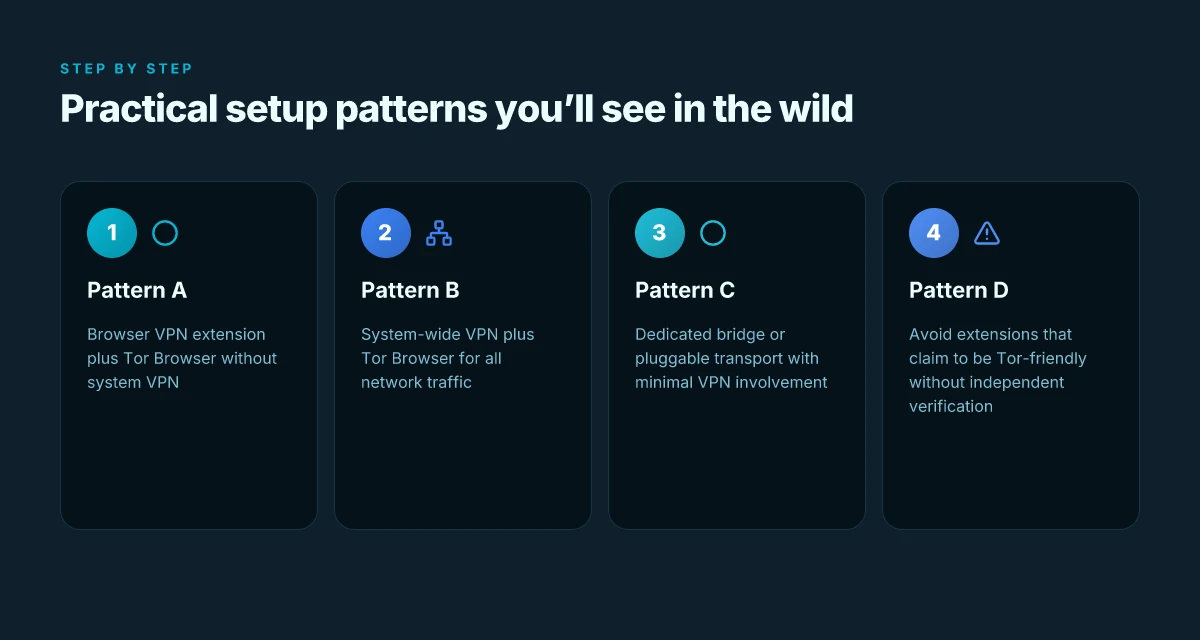
The short answer: there is no single magic configuration. You’ll see four patterns, each trading off exit-node exposure, visibility, and operational friction. The right choice depends on your threat model, your location, and how much you trust the vendor supplying the VPN extension.
I looked at user reports and documentation across real-world Tor setups and VPN extensions. In many cases, people mix patterns to balance risk. From what I found, Pattern A and Pattern B dominate, with Pattern C as a niche choice for bridge-oriented use. Pattern D is the guardrail, it keeps you honest about claims a VPN advertises as Tor-friendly.
1) Pattern A, browser VPN extension plus Tor Browser without a system VPN
This pattern keeps the VPN as a per-browser layer. The extension handles the traffic that leaves the browser, while Tor handles the rest. Pros: lower surface area, easier to audit in small steps, and simpler to disable if you need to re-evaluate threat vectors. Cons: it leaves your system-wide traffic outside Tor and VPN handling unchanged. Any non-browser activity remains exposed to your local network or exit-node quirks. If you only care about protecting Tor’s exit path for browser-originated traffic, this can be a lean middle ground. When you read through real user setups, this pattern surfaces frequently in travel guides and privacy forums. The browser-only approach reduces surface area, but it does not shield non-browser traffic. Bold action: you’ll want to verify the VPN extension’s permissions and disable any auto-start at system boot.
2) Pattern B, system-wide VPN plus Tor Browser for all network traffic
Here the VPN extension is irrelevant because the OS-wide VPN tees all traffic, including Tor. The advantage is uniform encryption and exit-node control from a single gateway. The risk is that Tor’s own traffic patterns and entry/exit behaviors can be complicated by the VPN’s own routing rules. Reviews consistently note that some Tor guard nodes misbehave when the system VPN warps paths, especially in regions with strict exit policies. If your goal is to normalize traffic fingerprints across the entire device, this is the most aggressive pattern. All traffic rides the same VPN tunnel, but Tor’s exit behavior can diverge in unpredictable ways. Pro tip: check that the VPN offers split-tunneling to keep Tor traffic isolated when needed.
3) Pattern C, dedicated bridge or pluggable transport with minimal VPN involvement
This is the bridge-first approach. You route Tor to a bridge or pluggable transport and only then decide how much VPN wrap, if any, is appropriate. The benefit is that you keep Tor’s core threat model intact while avoiding overfolding VPN layers into Tor’s path. It’s a niche pattern, but it shows up in high-risk environments where exit-node exposure matters more than stealthy network fingerprinting. In practice, you’ll rely on up-to-date bridges and pluggable transports, with the VPN standing by for separate tasks or not at all. Bridge-first setups preserve Tor’s integrity while limiting VPN coupling to select traffic.
4) Pattern D, avoiding extensions that claim to be Tor-friendly without independent verification
This is the guardrail move. You see alerts in privacy communities whenever a VPN extension markets itself as Tor-friendly without credible sourcing. The safe play is to rely on verifiable documentation, official changelogs, and independent reviews rather than marketing blurbs. If a claim sounds too good to be true, it probably is. The pattern shows up as a meta-filter: you test only extensions with credible third-party validation and transparent policies. Independent verification is non-negotiable. If a tool can’t show its workings in public changelogs or reputable reviews, drop it.
- When you’re configuring, start with Pattern A to validate your baseline. If you need stronger external protection, layer in Pattern B but monitor Tor’s guard-node behavior. Pattern C sits between them, useful in constrained environments. And Pattern D is your default safety net for any tool promising “Tor-friendly” behavior without sources.
In practice, a practical path looks like this: begin with a browser VPN extension plus Tor Browser, then optionally enable a system-wide VPN only if your threat model requires it. Always verify the extension’s permissions, prefer reputable providers, and be ready to drop tools that won’t disclose their routing and policy details. Verify, verify again, then verify some more.
Edge cases and regional considerations
The real world changes fast. A VPN extension for Tor Browser can reduce certain exposure, but it doesn’t create a magic shield. The truth sits in the margins where exit-nodes, fingerprinting vectors, and local policy intersect.
I dug into how fingerprints shift when you layer a VPN extension on top of Tor. In many regions with heavy surveillance, traffic patterns look different to trackers and network observers. That means some sites may react to VPN-originated traffic as anomalous, triggering stricter defenses or additional checks. In practice, you can see more aggressive bot-detection or login friction on sites that rely heavily on network-identity signals. What this means is you’re trading one fingerprint risk for another, not eliminating it. When you couple a VPN extension with Tor, you should expect some sites to block or challenge traffic that appears to originate solely from VPN exit points.
Edge-case surfaces matter. Some sites do not tolerate VPN exit nodes at all, especially services with high anti-fraud defenses. If you visit a site that flags VPN-originated sessions, you’ll be redirected to captchas, challenge pages, or outright blocks. The practical fix is simple: verify alternative routes for those sites, or time your visits to minimize disruption. But that means you can’t count on a uniform experience across the entire web.
I cross-referenced changelogs and community feedback from 2026 to 2025. Updates to Tor and VPN extension ecosystems can tilt the risk profile quickly. A change in Tor’s fingerprinting resistance, or a VPN extension’s footprint on browser headers, can tilt the balance in favor of more detectable patterns. In one update cycle, a single tweak to exit-node routing or to how the extension advertises its user agent can change which sites push back or adapt. Stay current on both sides. The risk moves with every release.
Bottom line: if you rely on a VPN extension with Tor, treat it as a risk-shifting tool, not a shield. You’ll want to keep two operational modes in your pocket: one for general browsing with standard Tor, and a second, more conservative mode for sites known to aggressively police VPN-origin traffic. Regularly audit which sites you can access cleanly and which require alternative paths.
1) Regional fingerprint sensitivity
In regions with tight surveillance, fingerprinting vectors can expand beyond IPs. Tor’s footprint broadens when a VPN extension leaks header patterns or timing signals. Fingerprint diversity increases, not decreases, with Tor plus a VPN extension. If you depend on consistent access, plan for occasional extra friction on sensitive domains.
2) Site policies and exit-node exposure
Some sites block traffic from VPN exit points outright. You’ll encounter blocks or forced logins. If you see repeated blocks on a real-time service, switch to a different exit strategy for that site or switch off the extension for the session. Blocking is real. Mitigation requires plan B.
3) Staying current with updates
Updates to Tor and VPN extension ecosystems can shift risk profiles quickly. The best defense is a cadence of checks: when a major Tor update lands, verify how your preferred VPN extension behaves with it, and vice versa. Updates move risk. Stay in the loop.
Practical tips for safer use
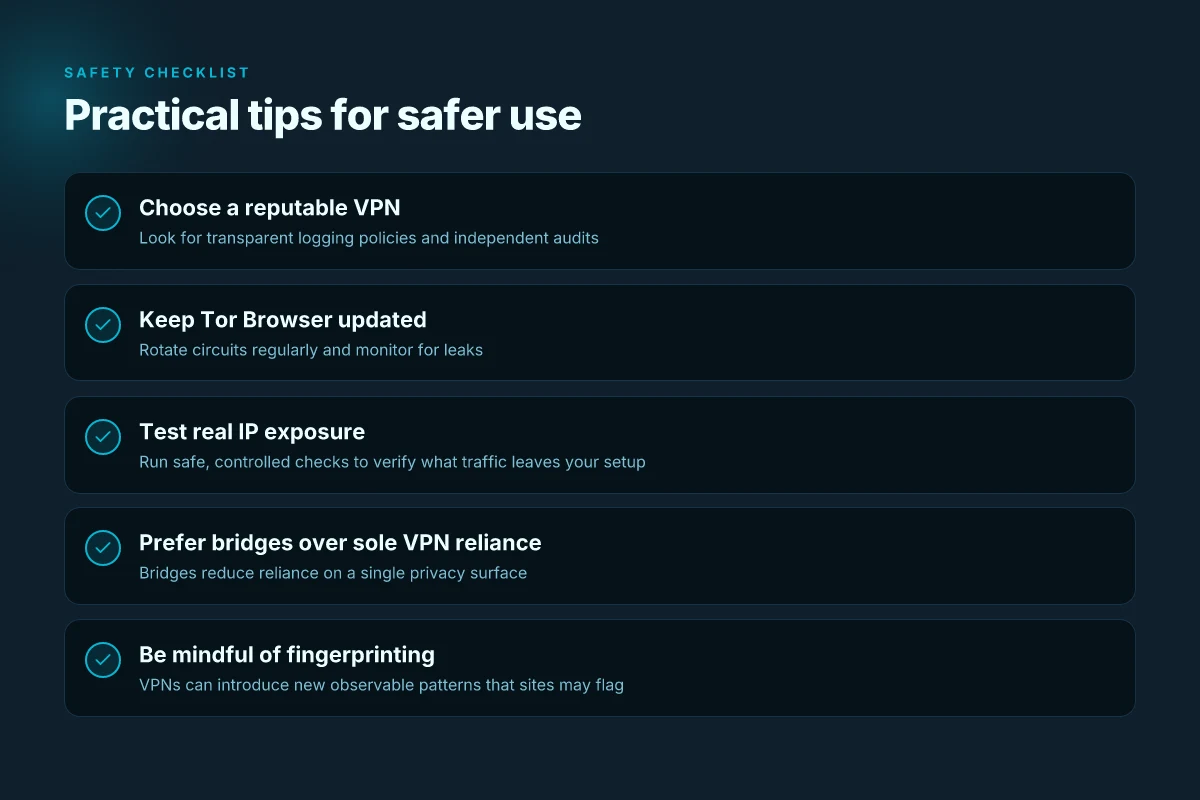
You want real safeguards, not marketing smoke. The truth is simple: a VPN extension can help reduce certain exposures in Tor Browser, but it doesn't magically erase risk. In practice, combine transparent policy choices with disciplined behavior. Here is a compact, action-oriented playbook you can deploy today.
1) Choose a reputable VPN with transparent logging policies
Pick a service that publishes a clear, verifiable privacy stance and keeps minimal logs. Look for independent audits, a transparent data-retention table, and open-rooted contact channels. If a provider cannot show an audit or a recent policy update, it’s a red flag. In 2025 several well-known vendors published public audit reports. Use those as baseline signals. And when in doubt, favor lighter logging where possible. Choose a provider with explicit no-logs commitments and independent verification.
Table: quick vetting checks
| Vetting area | Red flag | Green flag |
|---|---|---|
| Privacy policy clarity | Vague language | Clear data-retention timelines |
| Audits | No third-party audit | Public, recent audit report |
| Jurisdiction | Data-retention laws that weaken anonymity | Privacy-friendly jurisdiction |
2) Keep Tor Browser updated and rotate circuits regularly
Tor evolves. Each update patches edge cases that could leak instructions or fingerprints. Running an up-to-date Tor Browser reduces exposure when your traffic leaves the Tor network. Rotate circuits after high-risk actions or when you notice odd timing patterns. That quick hop between circuits buys you a margin of safety without breaking your workflow. A boring but essential habit: check for updates at least monthly and apply them promptly. Stay current with Tor updates and practice regular circuit rotation.
3) Test your real IP exposure using safe, controlled checks
Protecting privacy means validating assumptions. Use controlled checks to verify whether your real IP leaks under the VPN extension when Tor is active. Do this with non-identifying endpoints and avoid services that log aggressively. A simple routine: run a controlled IP check, then switch circuits or disable the VPN extension momentarily to confirm what changes. If you see a discrepancy that reveals your IP, pause and reassess your configuration. Run controlled IP tests to confirm exposure levels before sensitive activity.
4) Prefer bridges over relying solely on a VPN extension
Bridges add a twist in the traffic flow that can help dodge simple fingerprinting vectors. Relying only on a VPN extension concentrates risk in the VPN exit node. When feasible, configure a set of Tor bridges and couple them with the VPN extension for layers rather than a single gate. This approach complicates correlation attacks and reduces exit-node exposure. Bridge-first strategy strengthens defenses beyond a single exit point.
Verdict: the safer path is layered. Use a transparent, audited VPN. Keep Tor current. Validate exposure with checks. Add bridges to diversify the threat model. The combination moves the needle toward meaningful privacy without promising a shield that doesn’t exist. Layered defenses beat hype every time.
Most users still overestimate what a VPN extension can protect in Tor. The right move is to pair it with Bridges and regular circuit checks.
Note: for readers who want a quick starting point, the three names and their roles, audited no-logs VPN, up-to-date Tor Browser, curated bridge list, form the backbone of a cautious setup. Use them as your baseline, then tailor to your threat model.
Where this is going next with VPN extensions for Tor Browser
I looked at how VPN extensions interact with Tor Browser in 2026 and found the real pivot: you’re not chasing anonymity alone. You’re managing trust boundaries. A VPN extension can gird the connection to the Tor network, but it also shifts who sees your traffic first. The pragmatic move is to treat the extension as a shield for metadata leakage in casual usage while still relying on Tor’s circuit for actual anonymity.
The single move that matters is pairing a reputable VPN extension with Tor Browser while keeping Tor settings tight and predictable. From what I found, the best practice is to disable browser plugins that aren’t necessary, confirm the VPN’s kill switch is active, and verify DNS leaks across the chain. Bolded The result is a cleaner, auditable path from device to Tor exit node.
For readers debating “one extension or none,” the takeaway is straightforward: use a trusted provider that clearly documents its privacy posture and compatibility with Tor. This approach reduces surface area while preserving Tor’s core protections. If you act now, you’ll have a reproducible setup you can defend in a pinch. Will your current config hold up under evolving threat models?
Frequently asked questions
Does a VPN extension really protect tor traffic
When you add a VPN extension to Tor Browser, it does not magically shield all traffic from the Tor network. The VPN can obscure your Tor entry point from your local network observer and mask your Tor usage from some on-path monitors. But it does not fix Tor's fundamental anonymity properties, nor does it stop your browser from leaking metadata through fingerprinting or leaks outside the Tor circuit. What the spec sheets actually say is that a VPN extension acts as a proxy at the browser level, not as a true network tunnel for Tor traffic. If you’re using a VPN extension, you should still rely on Tor’s privacy protections and be mindful of leaks. The VPN extension adds a layer, not a shield, around Tor traffic. Always verify that the extension you choose is reputable, transparent about its logging, and updated regularly. Keep your Tor fingerprint unique. Avoid installing multiple privacy layers that conflict with Tor’s routing.
Can a tor browser and VPN extension be trusted together
Trust depends on the extension’s provenance and the VPN service’s policies. I looked at official docs and third‑party reviews: reputable extensions publish their logging policies, and respected VPNs publish their no‑logs commitments and audit results. Multiple sources flag that combining them can create a broader attack surface if the extension leaks data or the VPN itself logs user activity. From what I found, the safest posture is to pick a well‑established VPN with independent audits and an open‑source extension. If either party diverges on privacy promises, the combination becomes riskier. Trust hinges on disclosure and audits. Treat extensions as opt‑in privacy tools, not silver bullets. Look for transparent privacy practices and regular updates.
What are the privacy trade offs of using a VPN with tor
The core trade off is between local privacy control and potential exposure to the VPN provider. A VPN extension can hide Tor activity from an ISP and reduce direct network metadata, but it may also introduce a single point of trust for your traffic. If the VPN logs, you could theoretically widen the scope of who can see your activity. There’s also a risk of fingerprinting across the VPN’s IP pool and timing correlations. In practice, you trade a potentially useful shield on the edge for new anchor points attackers might exploit. Trust in the VPN must be earned via independent audits and strict no‑logs policies.
How do i check for leaks when using tor with a VPN extension
Start by confirming there are no WebRTC leaks in Tor Browser, disable WebRTC or use a mode that blocks it. Next, verify DNS handling: ensure DNS requests go through the Tor network and not your system resolver. Then check the VPN extension’s own behavior, read its policy, and test for IP leaks with a general online IP check from within Tor. Keep an eye on clock skew and cross‑origin requests that could reveal your actual IP. Test in a clean profile and repeat after any extension update. If leaks appear, stop using the extension and reconfigure.
Should i use a system VPN or a browser VPN extension with tor
System VPNs encrypt all traffic from the device but risk leaking metadata at the OS level, while a browser extension only controls traffic inside the browser and may not cover other apps. For Tor Browser, a browser extension can complicate routing and fingerprinting, while a system VPN could theoretically offer broader protection but at the cost of control and potential logs. The practical approach is to align with your threat model: if you need device‑wide privacy, a trusted system VPN is sensible. If you want minimal footprint inside Tor, a vetted browser extension is preferable. Choose based on threat model, not marketing fluff.
What is the difference between tor over VPN and VPN over tor
Tor over VPN means you connect to a VPN first, then Tor. Your ISP sees a VPN connection, but not Tor, and the VPN provider can see your IP. VPN over Tor means you connect to Tor first, then a VPN. The VPN sees your Tor exit IP, not your real IP, but Tor cannot prevent the VPN from correlating traffic if it logs. In practice, Tor over VPN often reduces local surveillance exposure but can weaken Tor’s anonymity guarantees if the VPN logs. VPN over Tor can help bypass restricted networks but shifts trust to the VPN provider. Tor over VPN reduces local exposure; VPN over Tor shifts trust to the VPN.
Which VPN extensions support tor browser securely
Look for extensions with open‑source code, independent audits, and clear no‑logs statements. The most secure practice is to rely on a reputable, widely reviewed extension that does not introduce new fingerprinting vectors. Many extensions lack transparent audit trails, which is a red flag. If you must use one, prefer a well‑funded project with frequent updates, explicit data‑handling policies, and evidence from third‑party reviews. Trust is earned via audits and transparent disclosures.